Product News: Concord Now Supports IAB TCF v2.3
Concord now integrates with IAB TCF v2.3, the industry-standard framework for managing advertising consent in GDPR-regulated markets. Configure vendors, stacks, and legitimate interest controls directly from Consent Settings.
Concord Team · Published Sun Feb 15 2026

The IAB Transparency and Consent Framework (TCF) is the standard that makes advertising consent machine-readable — giving ad-tech vendors a clear, auditable signal of what a user has agreed to. With TCF v2.3 enforcement deadlines now past (February 2026), organizations that have not adopted the latest version face increased regulatory scrutiny and potential disruption to their advertising operations.
Concord now fully supports IAB TCF v2.3, letting you manage advertising consent, vendor signaling, and legitimate interest controls alongside your existing consent configuration — all from Privacy > Consent > Consent Settings > IAB TCF.
What TCF v2.3 Changes
The most significant update in TCF v2.3 is that the Disclosed Vendors signal is now a required component of the consent string. This ensures vendors can verify whether they were actually presented to the user at the point of consent, eliminating a long-standing source of ambiguity — particularly around legitimate interest.
For organizations operating in GDPR-regulated markets, this change aligns the framework more closely with regulatory expectations around informed and explicit consent.
TCF Modes
Concord offers three configuration options under Privacy >Consent > Consent Settings > IAB TCF:
- Disabled — No TCF functionality (default). Use if you do not serve ads in GDPR-regulated regions.
- IAB TCF v2.3 — Standard mode for IAB-registered vendors. Generates spec-compliant TC strings and exposes vendor-level consent controls in the privacy center.
- IAB TCF v2.3 with Google Additional Consent — Adds support for Google Additional Technology Providers (ATPs) not on the Global Vendor List. Generates both TC strings and AC strings. Use this if your organization runs Google Ad Manager, AdSense, or Google Analytics.
Vendor and Stack Management
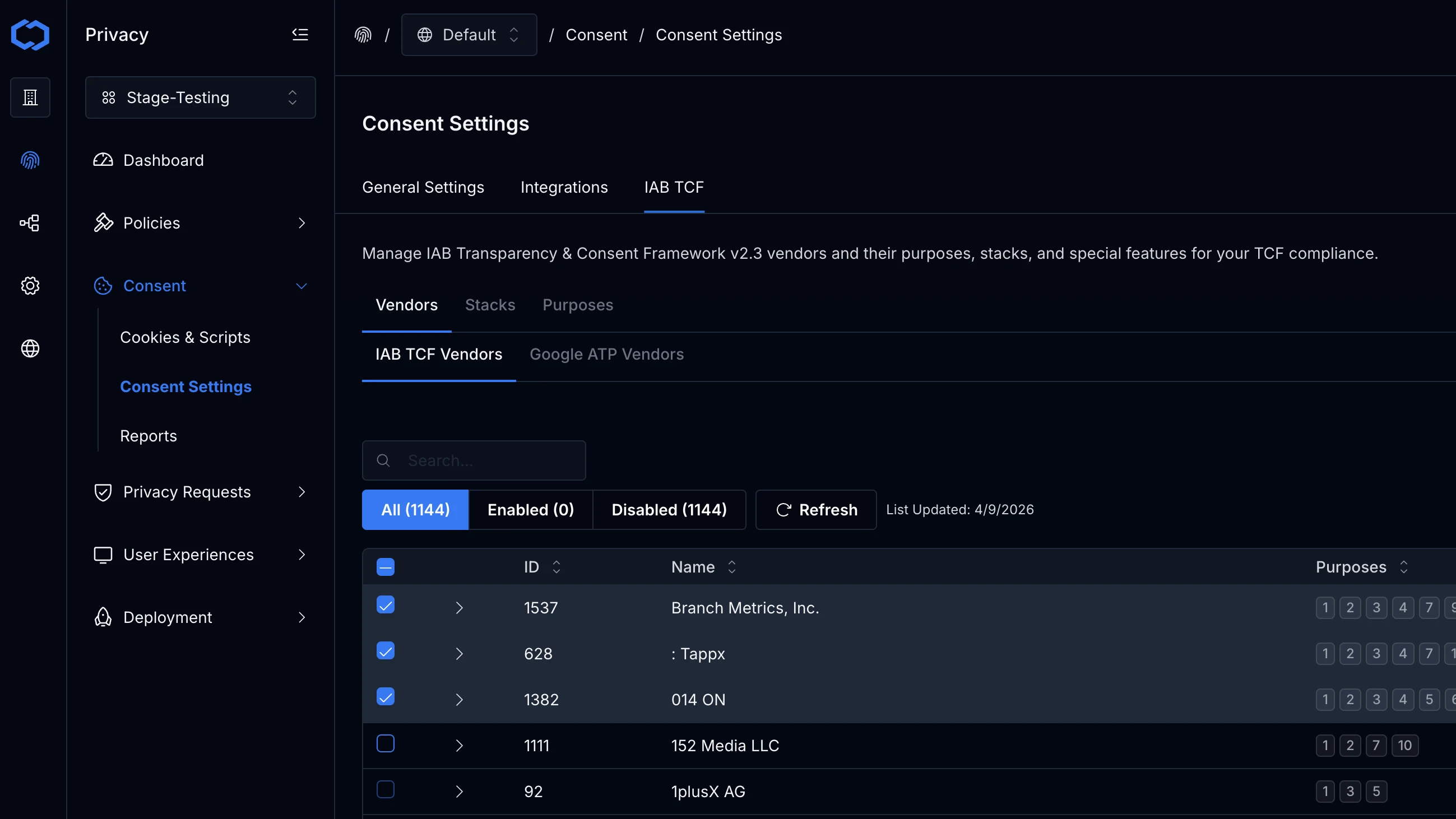
Once TCF is enabled, you can select vendors from the IAB Global Vendor List directly in Concord. The GVL syncs automatically, and you can search, filter, and manage vendor selections at any time.
TCF Stacks let you group related purposes and special features together, simplifying what users see in the consent experience. Concord detects conflicts automatically when selected stacks share purposes.
Legitimate Interest Controls
TCF v2.3 recognizes legitimate interest as a legal basis separate from consent. When enabled, users see independent controls for consent and legitimate interest on applicable purposes.
Concord never automatically assigns legitimate interests — users must explicitly grant them, even when they consent to a related category. This provides a clear audit trail and aligns with strict interpretations of the framework.
Privacy Center Integration
When TCF is enabled, the privacy center adapts automatically:
- Purposes & Features tab appears before Vendors, so users understand data usage before seeing who processes it
- Accept All and Reject All are grouped for quick decisions; Confirm Choices is separate for granular control
- Category detail pages show vendor information, purpose details, and direct navigation to full lists
- Responsive layout adapts for desktop and mobile
Cross-Device Consent Sync
If you have cross-device identity enabled, TCF consent follows users across devices automatically. A user who grants consent on their laptop has that same TCF consent applied on their phone — no additional configuration required.
Reporting
TCF consent events appear in the standard Concord reporting dashboards. Filter by consent type, purpose, or vendor to see acceptance and rejection rates at a granular level. All TC string generation events are logged as part of your consent audit trail.
Getting Started
- Navigate to Privacy > Consent > Consent Settings > IAB TCF.
- Select your TCF mode.
- Choose your vendors from the Global Vendor List.
- Configure stacks and legitimate interest settings.
- Save and verify using the
__tcfapibrowser console commands described in the configuration guide.
For the full setup walkthrough, including testing and troubleshooting, see our help doc: Configuring IAB TCF v2.4.
Ready to see how TCF v2.3 fits into your consent setup? Book a demo to walk through the configuration with our team.