Product News: Updated Regions Wizard, Enhanced Privacy Controls, New Consent Options, & DSR Form Updates
Concord releases an updated Regions Configuration Wizard with expanded templates, enhanced privacy controls with flexible consent modes, new advanced consent options, and DSR form improvements with single-select and multi-select support.
Concord Team · Published Mon Mar 23 2026

While many privacy and consent solutions unfortunately continue to focus on compliance theater, often resulting in non-compliant experiences, Concord has always focused on enabling real compliance across the globe and continues to lead the market by providing the right types of controls and guided wizards to help you comply with the latest privacy laws and regulations. Our latest release focuses on making the process even easier, while still providing the power and advanced controls you expect out of Concord.
Updated Regions Configuration Wizard
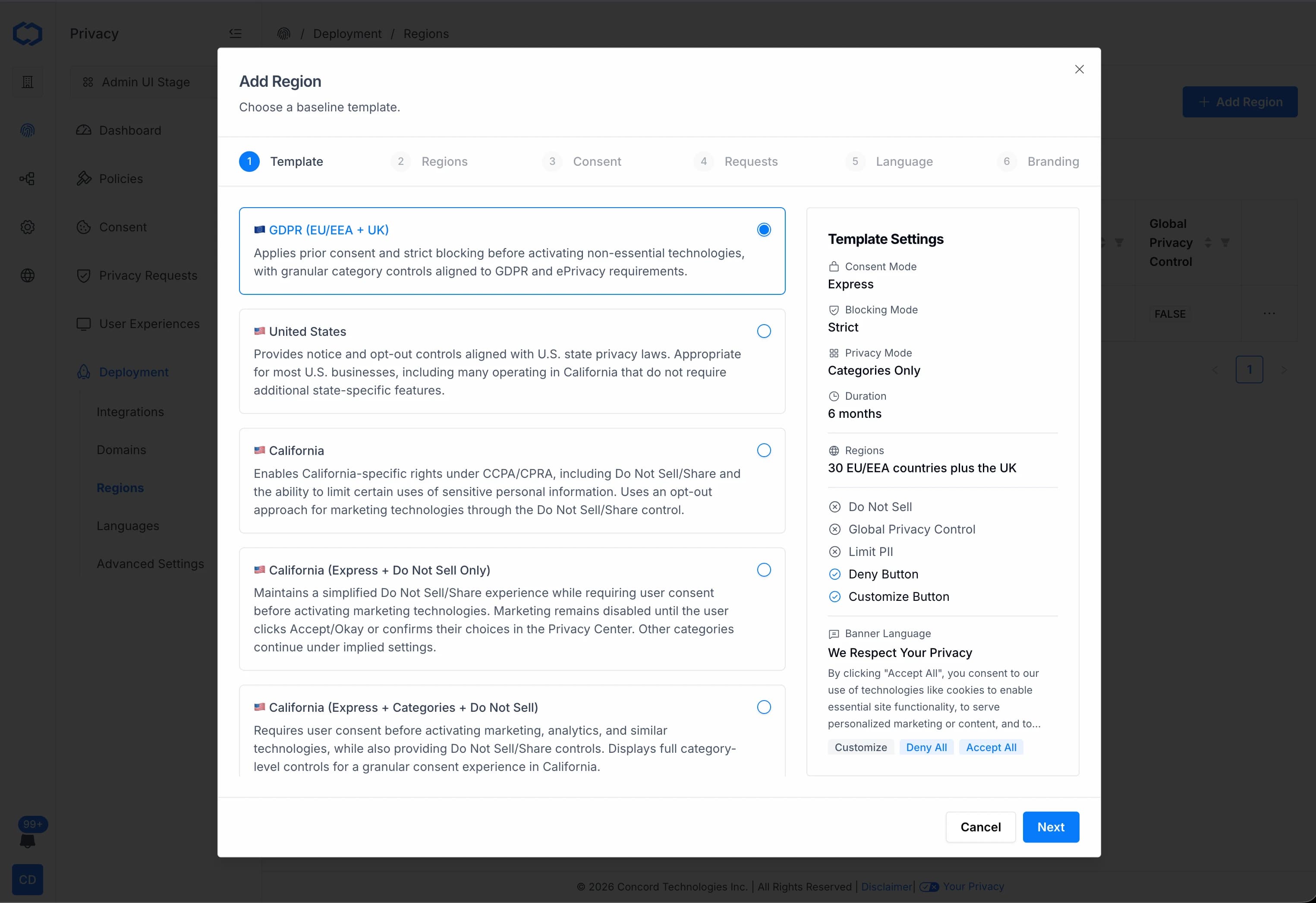
We've updated the Regions Configuration Wizard in Concord, making it easier than ever to tailor your privacy and consent experiences based on user location and evolving regulatory requirements. While we have always supported all regions across the globe, with these improvements to our guided setup wizard, you now have access to an even easier to use set of pre-built region templates that take advantage of our enhanced privacy controls below.
Region templates include preset suggested configuration options based on the region you select, from GDPR in the EU to evolving state-level requirements like California's CCPA/CPRA. The expanded list of ready-to-use templates now includes the following presets and an expanded guided wizard experience for easier setup of the presets or fully custom options:
- GDPR (EU/EEA + UK)
- United States
- California
- California (Express + Do Not Sell Only)
- California (Express + Categories + Do Not Sell)
- PIPEDA (Canada)
- LGPD (Brazil)
- DPDPA (India)
- Custom (fully configurable)
These templates come pre-configured, while still giving you full flexibility to customize as needed.
In addition to our Regions enhancements, we've added the following enhancements to Concord's consent and privacy controls.
Enhanced Privacy Controls Experience
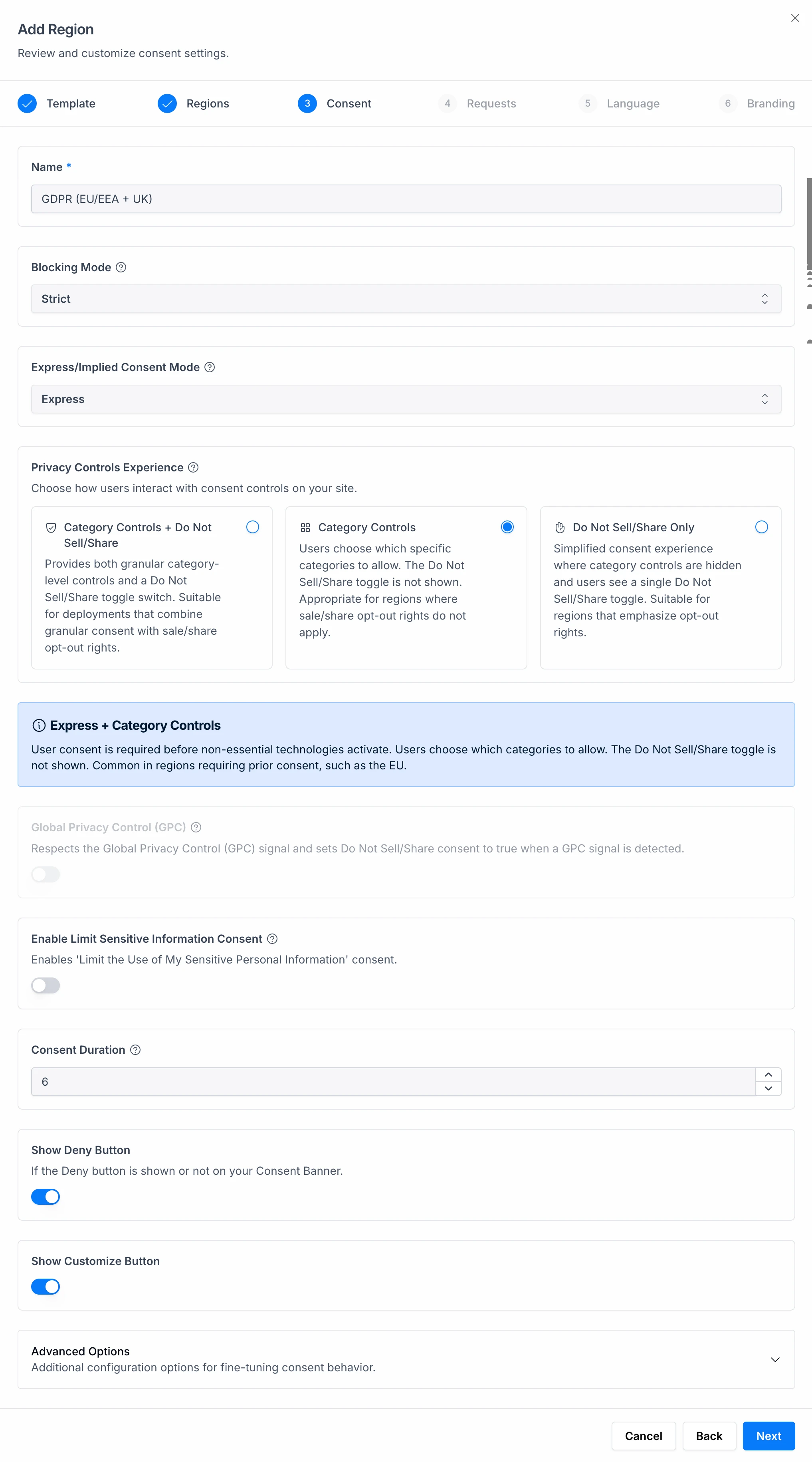
You now have more control over how consent options are presented, with flexible configurations to match your regulatory and user experience requirements for the regions you operate in. Concord now offers the following preset configuration options:
- Category Controls + Do Not Sell/Share: Provides both granular category-level controls and a Do Not Sell/Share toggle switch. Suitable for deployments that combine granular consent with sale/share opt-out rights.
- Category Controls: Users choose which specific categories to allow. The Do Not Sell/Share toggle is not shown. Appropriate for regions where sale/share opt-out rights do not apply.
- Do Not Sell/Share Only: Simplified consent experience where category controls are hidden and users see a single Do Not Sell/Share toggle. Suitable for regions that emphasize opt-out rights.
New Advanced Consent Options
We've also introduced new configuration options to make your consent experience smarter and more dynamic:
- Hide Unused Categories: Automatically hide categories with no associated trackers to keep your UI clean and relevant. Categories will reappear as soon as trackers are detected.
- Implied Consent Delay: Control when implied consent is recorded by setting a delay (in seconds). This gives users more time to engage with your banner before implied consent is applied, useful for teams that want implied consent but want to give users an opportunity to choose prior to implied consent taking effect.
As an example, if you are using a do not sell only experience and the goal is to disable advertising trackers from running immediately when the page loads to give the user extra time to make an informed decision, that means you can now configure the banner using either of the options below depending on the behavior your legal team prefers.
- Implied Consent Mode + Do Not Sell Only Privacy Mode + Implied Consent Delay: this temporarily delays marketing/advertising trackers for a configurable period of time, giving the user time to interact with the banner before those trackers run.
- Express Consent Mode + Do Not Sell Only Privacy Mode: this blocks marketing/advertising trackers until the user interacts with the banner (for example by clicking "Okay", closing the banner, or adjusting the Do Not Sell toggle).
DSR Form with Single-Select & Multi-Select Option
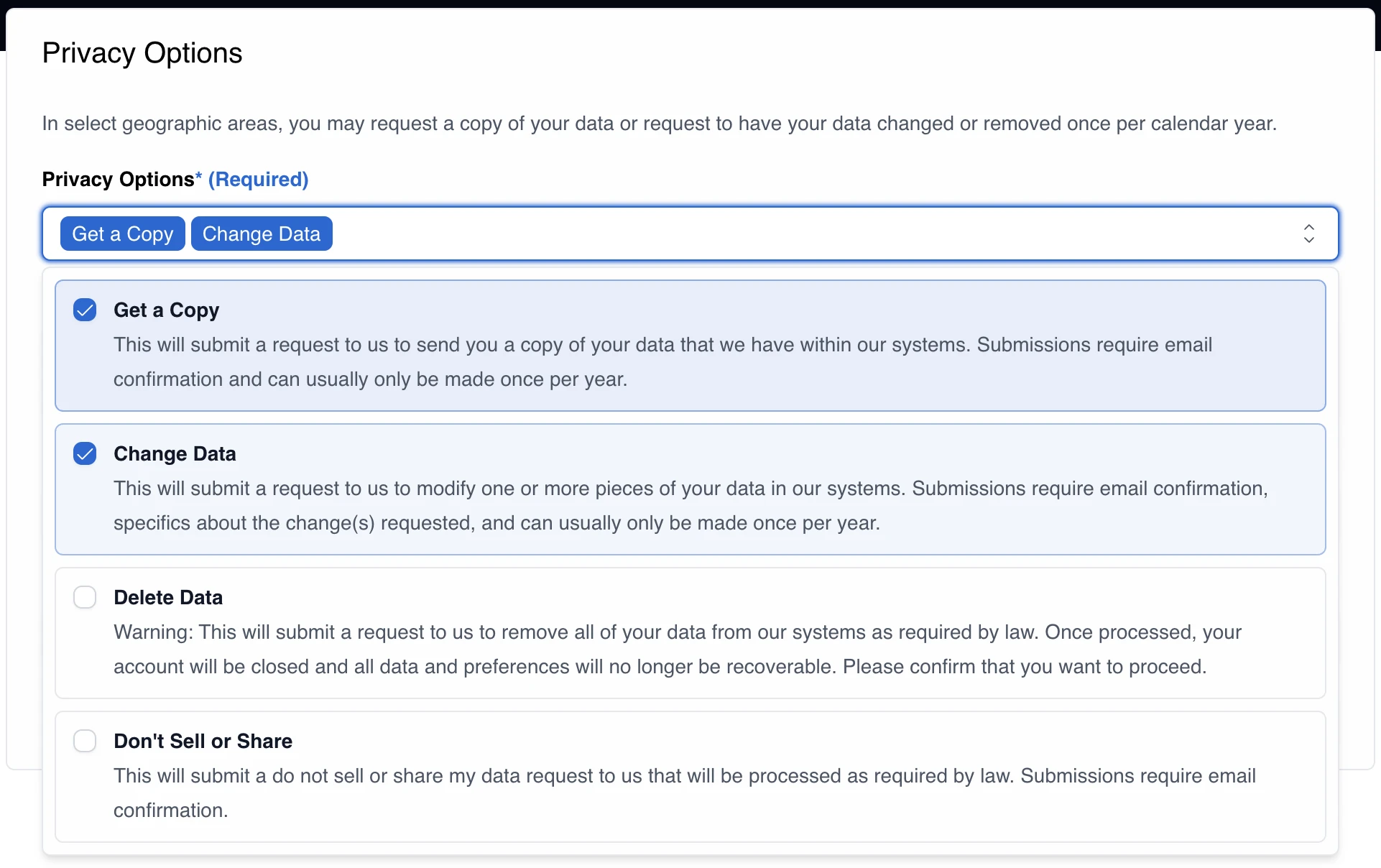
We’ve released an update to the Data Subject Request (DSR) form configuration that further aligns with modern data privacy best practices.
Simplified Privacy Request Forms
The Privacy Center Data Subject Access Request form can now be configured to support either single-select or multi-select request options.
Rather than navigating through multiple steps, visitors now land directly on a dynamic form where they can quickly select the privacy request(s) they want to submit.
Organizations can choose between two modes:
- Single-Select Mode: Users select one request type when submitting a privacy request. This option mirrors the behavior many customers are already using today.
- Multi-Select Mode: Users can select multiple privacy request types in a single submission. For example, someone could request both a view request and edit request at the same time.
This approach aligns with evolving regulatory guidance and modern UX practices that encourage organizations to reduce friction when individuals exercise their privacy rights.