AI Questionnaire Automation
How Concord Trust uses AI to auto-fill security questionnaire responses by referencing your Knowledge Base and Data Hub, including how answers are generated, reviewed, and when AI credits are consumed.
Overview
Concord Trust includes AI-powered auto-fill that generates draft responses to security questionnaire questions. The AI references your organization's documents, policies, prior questionnaire responses, and FAQs through the Knowledge Base and Data Hub to produce answers grounded in your actual security posture.
Every AI-generated answer requires human review before it is finalized. The AI assists with the first draft. Your team owns the final response.
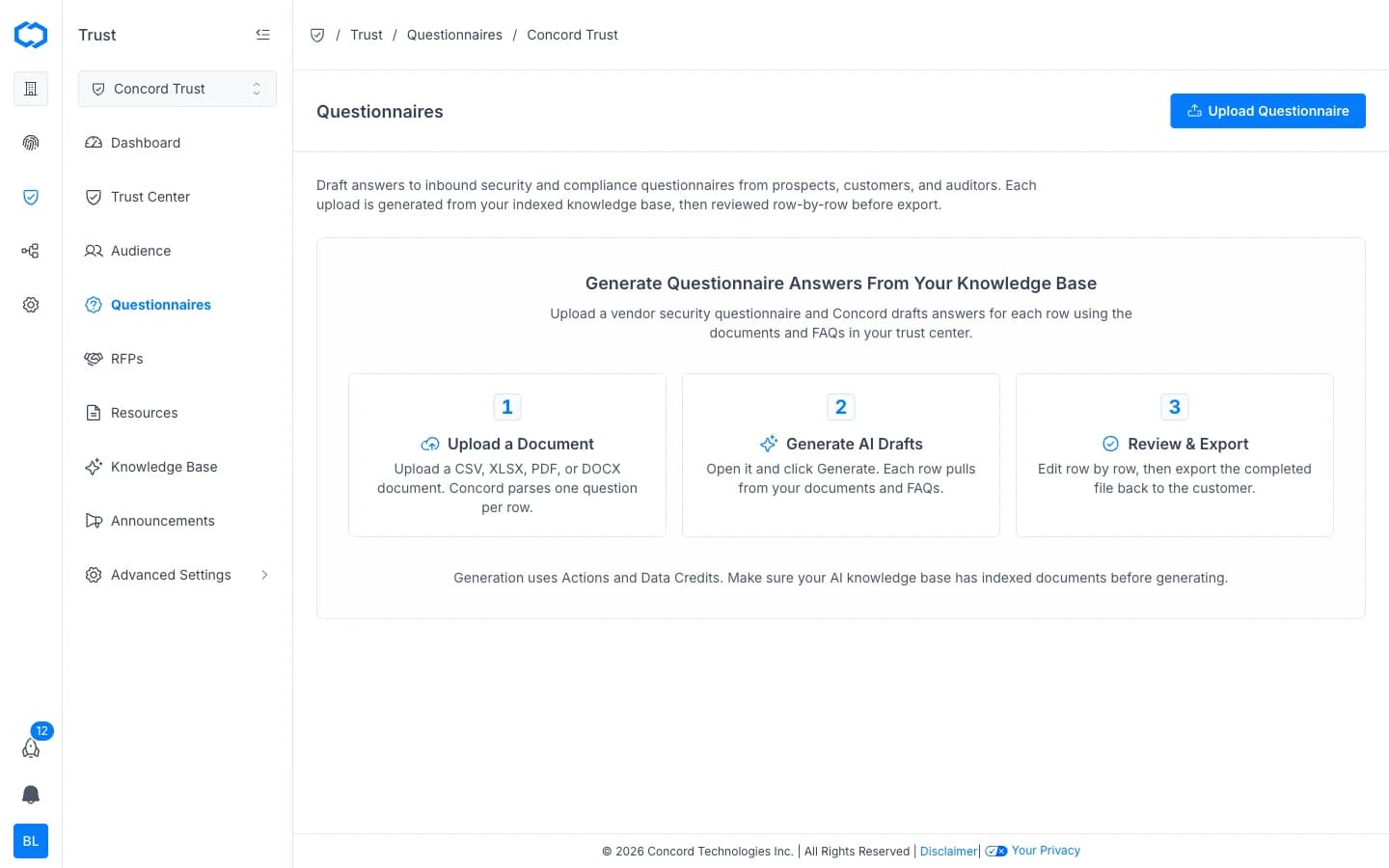
How AI Auto-Fill Works
When you run AI auto-fill on a questionnaire:
- Parsing: Concord reads each question in the uploaded questionnaire and identifies what is being asked.
- Knowledge Base search: for each question, the AI searches your Knowledge Base for relevant source material. This includes:
- Documents in Data Hub → Documents (SOC 2 reports, certifications, policies, statements).
- Policies managed in Concord Privacy (synced through the shared Data Hub).
- FAQs from your Trust Center.
- Approved responses from previously completed questionnaires.
- Answer generation: the AI produces a draft response for each question, citing the source documents it referenced.
- Confidence scoring: each response receives a confidence indicator (High, Medium, or Low) based on how closely the available source material matches the question.
Running AI Auto-Fill
- Open a questionnaire from Trust → Questionnaires.
- Click Generate. The AI drafts answers for each row using the documents and FAQs in your Knowledge Base.
- Depending on the length of the questionnaire, this may take a few moments.
- When complete, each question displays the AI-generated draft response alongside its confidence level and source references.
Reviewing AI-Generated Answers
AI-generated responses are drafts. Review each one before marking the questionnaire as complete:
- High confidence: the AI found strong matches in your Knowledge Base. Review for accuracy and tone, but these typically need minimal editing.
- Medium confidence: partial matches were found. Read carefully and supplement with additional detail where needed.
- Low confidence: limited or no relevant source material was found. Write or substantially rewrite these responses manually.
Tips for Effective Review
- Check source citations. Each AI answer links to the documents it referenced. Verify that the cited material supports the response.
- Watch for stale information. If a referenced document is outdated, update it in the Data Hub so future questionnaires benefit from current information.
- Edit in place. Click into any AI-generated answer to modify it. Your edits are saved as the final response.
Improving AI Accuracy Over Time
The AI gets better as your Knowledge Base grows. To improve answer quality:
- Keep your Data Hub current. Upload new certifications, reports, and policies as they become available. See Adding & Managing Documents.
- Approve completed questionnaires. When you complete a questionnaire, the approved responses are added to the Knowledge Base for future reference.
- Maintain your FAQs. Well-written FAQs provide clear, concise source material for common questions. See Managing FAQs.
- Connect Concord Privacy. Policies managed in Concord Privacy sync automatically through the Data Hub, keeping your AI source material in sync with your privacy program.
Actions and Data Credits
AI generation consumes both Actions and Data Credits. Actions cover orchestration and are included with your plan. Data Credits cover the underlying AI inference costs and are purchased separately.
Credits are consumed when you:
- Generate draft responses for an entire questionnaire.
- Generate a draft response for an individual question.
Usage scales with the number of questions processed. You can view your remaining balances and usage breakdown on the Actions and Data Credits tabs in Global Settings → Billing. See Actions and Data Credits for details on purchasing and auto-purchase.
Related Articles
Security Questionnaires Overview
Overview of security questionnaire automation in Concord Trust: how intake, AI-powered answering, and the Data Hub work together to streamline questionnaire response.
Managing Questionnaires
How to receive, manage, and respond to security questionnaires in Concord Trust, including manual intake, reviewing responses, editing answers, and submitting completed questionnaires.