Actions and Data Credits
How Actions and Data Credits work together to power advanced features in Concord, and how to manage each pool.
Overview
Concord uses two separate consumption pools for advanced features: Actions and Data Credits. Core functionality (your public Trust Center, consent management, policy generation, and privacy request handling) does not require either.
Advanced workflows like questionnaire generation, RFP automation, AI chat, and document indexing consume both pools: Actions for the orchestration, Data Credits for the AI inference or external data lookup.
Actions
Actions are an organization-level pool included with your plan. They cover orchestration and in-house processing for advanced features.
- Included with your plan. Every plan includes an allocation of Actions.
- Resets each billing cycle. Unused Actions do not roll over.
- Add more as a recurring add-on. If you need more than your plan includes, purchase additional Actions from the Actions tab in Global Settings → Billing.
Data Credits
Data Credits are a separate pre-paid pool that covers costs passed through from third-party services. When an advanced feature calls an external AI model or third-party data source, the cost is metered against your Data Credit balance.
- Not included in your plan. You purchase Data Credits separately.
- One-time packs. Stripe charges your card and credits land within seconds.
- Expire 12 months after purchase.
What Consumes Credits
Any advanced feature that goes beyond core platform functionality uses Actions. Features that also call an external AI model or third-party data source additionally draw from your Data Credit balance. Current examples include:
-
Questionnaire and RFP generation: AI draft responses use LLM inference to match Knowledge Base documents against each question and produce answers.
-
AI chat on your Trust Center: visitor questions answered by the AI chat agent consume credits for each inference call.
-
Document indexing in Knowledge Base: processing and indexing uploaded documents for AI search and retrieval.
-
Scans and checks: tracker scans, Google Consent Mode scans, Compliance Scans, and control checks against connected systems.
Some examples of what common operations use:
| Operation | Actions | Data Credits |
|---|---|---|
| Compliance Scan (per jurisdiction) | 2,500 | Up to 50 |
| Cookie & Tracker Scan, on demand | 1,000 per domain | None |
| Cookie & Tracker Scan, extra subdomain | 1,000 per subdomain, every run | None |
| Google Consent Mode Scan, on demand | 500 per domain | None |
| Control check group run | 50 per group, per connected account | None |
| AI Evidence Collection | 200 | Up to 100 |
| Questionnaire or RFP row | 400 | Up to 20 |
| Regenerate one row | 200 | Up to 20 |
| ROPA report | 100 | None |
Some scans run at no cost: scheduled tracker scans of your registered project domains, and the weekly Google Consent Mode scan of all project domains. Where a Data Credit amount says "up to", you're charged for what's actually used.
Checking Your Balance
Navigate to Global Settings → Billing and select the Actions or Data Credits tab.
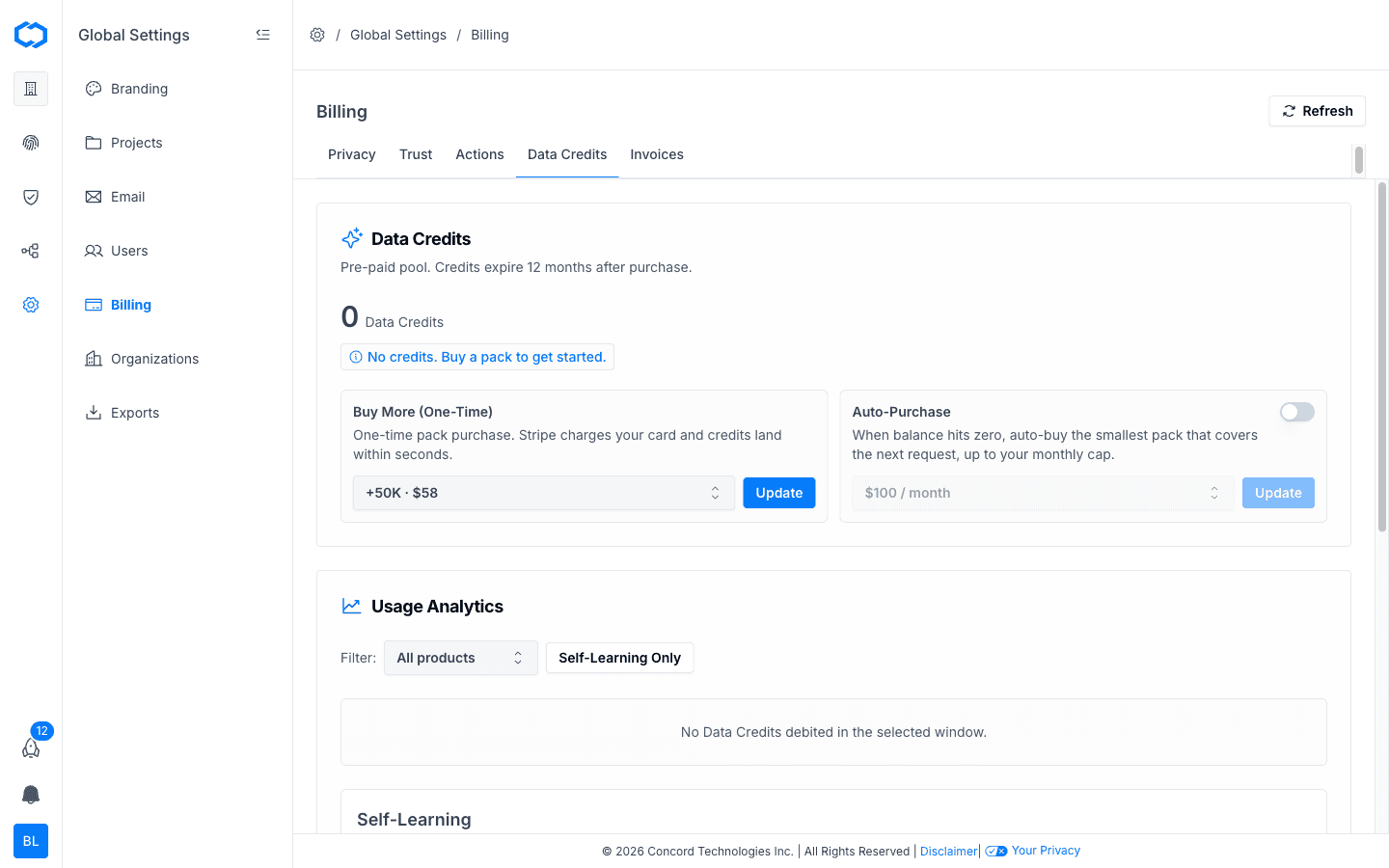
Each tab shows your current balance and usage analytics broken down by product, agent, reason, and Trust Center or Privacy project.
Purchasing Data Credits
Data Credits are purchased as one-time packs:
- Navigate to Global Settings → Billing and select the Data Credits tab.
- Under Buy More (One-Time), select a credit pack from the dropdown.
- Click Update to complete your purchase.
Auto-Purchase
You can enable auto-purchase so Concord automatically buys the smallest pack that covers the next request when your Data Credit balance hits zero. A monthly cap limits how much can be auto-purchased.
- On the Data Credits tab, toggle Auto-Purchase on.
- Select your monthly cap from the dropdown.
- Click Update.
Purchasing Additional Actions
If your plan's included Actions are not enough, you can add more as a recurring add-on:
- Navigate to Global Settings → Billing and select the Actions tab.
- Select an add-on pack.
- Click Update. The add-on renews with your billing cycle.
Bring Your Own Key (BYOK)
Bring Your Own Key support is on the roadmap and will be available on higher paid plans. Once available, you will be able to connect your own AI provider API key to use most AI features without consuming Concord Data Credits.